

AI tools are easier to get than ever. The harder question is how can use them without creating new risk.
The AI conversation has shifted, and most people haven’t caught up to where it actually is.
A year ago, the question was access. Could your company afford the tools? Could your team figure them out? Could you get past the learning curve fast enough to matter? That question is fading. Tools are broadly available. Many are free or nearly free at entry level. The barrier to entry has dropped to almost nothing.
But “free to start” is not the same as “cheap to run.” At enterprise scale, the economics are different and getting harder. Compute costs have not followed the trajectory that most AI marketing implies. Energy costs, as we covered in last month’s Trend Watch, are climbing. The large AI companies themselves are not yet generating profits proportional to their infrastructure spend, which means the current pricing environment is unlikely to last. When the subsidy phase ends, the companies that deployed carelessly will feel it twice: once in rising costs, and once in the operational debt they accumulated when the tools were cheap.
What is GenAI? Generative AI refers to AI systems that create new content, such as text, images, code, audio, or video, based on patterns learned from large amounts of data. In business settings, GenAI is often used for drafting, summarizing, research support, content creation, and workflow assistance. The risk is that fluent output can look authoritative even when it is incomplete, wrong, or unsafe, which is why human review still matters.That would be enough to think about. But there’s a second shift happening at the same time. And it’s arguably much more consequential.
The market is moving past basic chat use and into systems that can retrieve information, use tools, act across software, and make limited decisions on their own. This is the shift from AI as a writing assistant to AI as a semi-autonomous operator. Gartner says the growth of agentic AI applications and Model Context Protocol (MCP) is creating new avenues for cyberattacks and other exploitations, especially when those AI systems access sensitive data, ingest untrusted content, and communicate externally – all in the same workflow. Open Worldwide Application Security Project‘s (OWASP) latest guidance reinforces the point by highlighting prompt injection, excessive agency, and unsafe handling of tool output as leading risks in agentic applications.
The AI story is shifting from “Can it help?” to “What exactly can it touch, what can it do, and who is accountable when it gets something wrong?” That’s a different management problem. And it’s arriving at the same time the cost assumptions are about to change.
Why Does It Matter?
The real divide is becoming operational maturity. Two companies can buy the same AI tool. One gets speed. The other gets new exposure.
This isn’t theoretical. Reuters reports that banks in Asia and Australia are already revisiting their AI deployment protocols because frontier models could increase the speed and scale of cyberattacks. Gartner predicts that by 2028, a quarter of enterprise GenAI applications will experience at least five minor security incidents per year, driven in part by immature security practices around agentic systems. The pattern is clear: the organizations that moved first on AI are now moving first on governance, because they’ve seen what ungoverned deployment actually looks like.
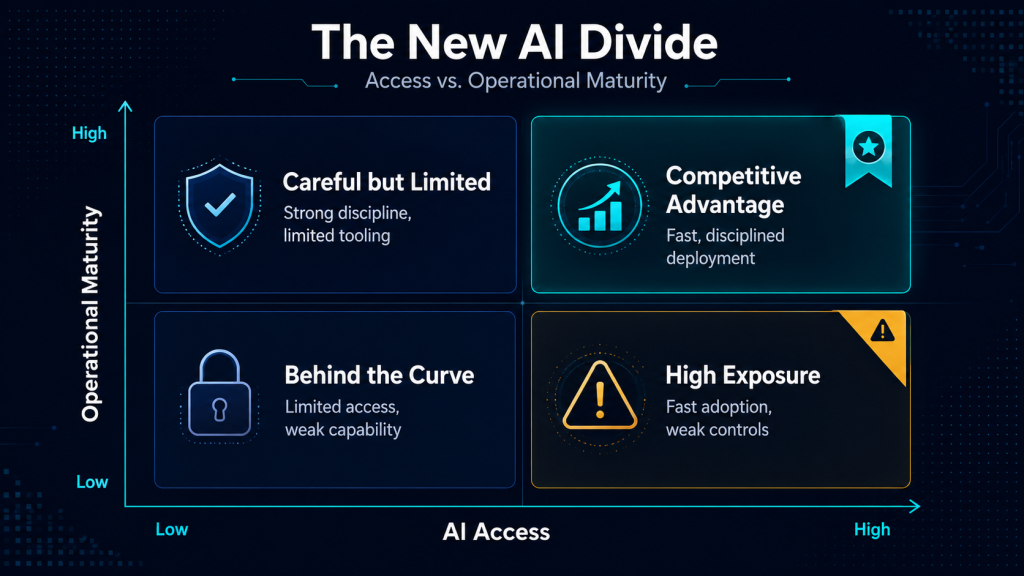
For OMSDC’s audiences, the implications split three ways.
A small firm can adopt AI quickly. That’s genuinely good. But a small firm can also expose customer data, internal files, or API credentials quickly if the tool is poorly configured. For a company with no IT department and thin margins, a data exposure event isn’t a learning experience. It’s an existential one.
A larger minority business may already be connecting AI to client service, documentation, proposals, and internal workflows. The question isn’t whether the tools work. It’s whether those connections have clear boundaries, review points, and someone accountable for what the system does when no one is watching.
A corporate member will increasingly evaluate suppliers through this lens. A vendor that uses AI carelessly can become a security or compliance liability. A vendor that uses it with discipline becomes more responsive, more consistent, and easier to trust. That difference will show up in execution long before it shows up in a questionnaire.
The point for every reader is the same: access alone won’t create advantage. Controls, review processes, and permission design will. And deploying well isn’t just a security question anymore. With costs poised to rise, it’s also an economics question. The firms that build disciplined, efficient AI workflows now will be the ones that can afford to keep running them later.
Where Do AI Agents Fit In?
If you’ve been following the AI conversation this year, you’ve probably heard the word “agent” more than any other term. It’s where productivity and risk start to converge, and the distinction matters more than most coverage suggests.
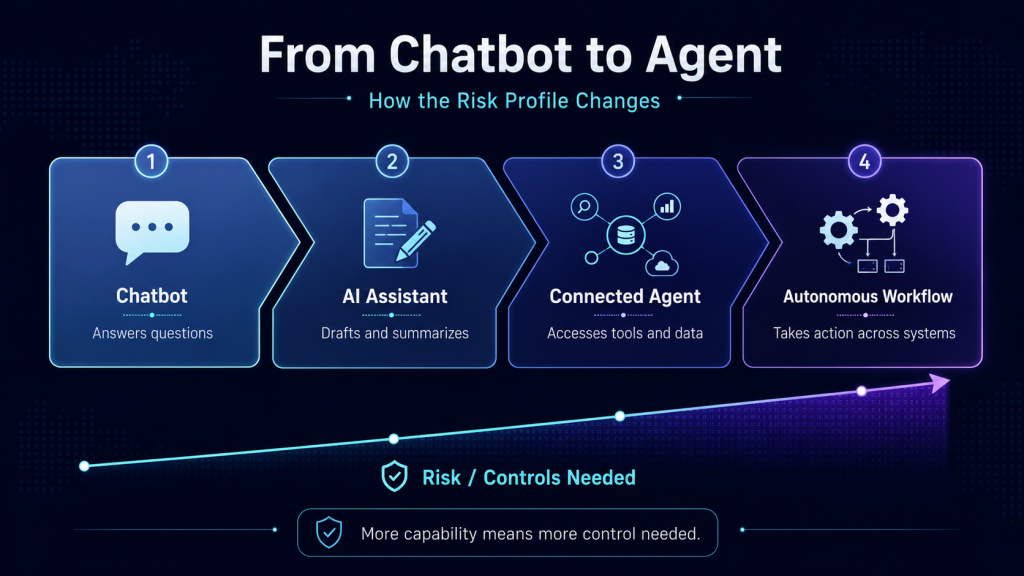
A standard AI chat tool generates text in response to a question. You ask, it answers. An agent does something fundamentally different. It can call tools, access files, browse the web, send messages, update databases, or orchestrate multiple steps in sequence. That’s genuinely useful. It’s also a genuinely different risk profile.
What is an AI agent? An AI agent is a system that does more than answer a prompt. It can plan, take actions, call tools, interact with external systems, and carry work forward across multiple steps. NIST describes AI agents as systems capable of autonomous actions such as writing and debugging code, managing calendars and email, and handling other emerging tasks. That added usefulness is exactly why control, permissions, and monitoring become more important.Think of it this way. A chatbot that drafts a bad email wastes your time. An agent that sends a bad email wastes your client’s trust. A chatbot that hallucinates a number gives you wrong information. An agent that hallucinates a number and enters it into your accounting system gives you a wrong record that looks like a real one. The failure modes change when the system can act, not just speak.
OWASP describes “excessive agency” as a real vulnerability when an LLM has too much ability to trigger actions in response to manipulated or ambiguous inputs. Gartner warns that ordinary use can produce security failures when agents both touch sensitive data and consume untrusted inputs. Axios’ recent cybersecurity roundtable made the same point from an access-control angle: organizations are not yet managing agents with the same discipline they would apply to any other privileged workload that can read, write, and execute across systems.

Most business leaders hear “agent” and think convenience. Instead, they should hear “permissions,” “scope,” and “review.” A workflow that can take action isn’t just a better chatbot. It’s closer to a junior intern who works fast, never sleeps, and has no judgment about when to stop and ask. Deploying agents aren’t just about productivity. It needs to be a governance and cybersecurity discussion.
What does “excessive agency” mean? Excessive agency is the security risk that appears when an AI system has too much authority, too many connected functions, or too much autonomy for the job it is supposed to do. OWASP defines it as a vulnerability that enables damaging actions when an LLM-based system can call functions or interact with other systems in response to ambiguous, manipulated, or otherwise faulty outputs. The business version is straightforward: an AI assistant that should only retrieve information should not also be able to delete records, send messages, or trigger transactions without tighter controls.Why System Prompts and Surface Guardrails Are Not Enough
Many teams still treat AI safety as a prompt-writing problem. Write better instructions. Add guardrails to the system prompt. Tell the model what not to do. Hope it listens.
System prompts and better instructions are good. But relying on hope is increasingly insufficient, as the gap between what prompts can control and what systems can do is widening.
OWASP’s 2025 guidance confirms that prompt injection remains a core vulnerability, and that techniques like retrieval-augmented generation (RAG) and fine-tuning don’t fully solve it. NVIDIA’s AI red-team work adds another layer: new semantic and multimodal prompt-injection techniques can bypass existing guardrails entirely, which is why output controls, layered defenses, and behavioral analysis matter more than relying on a single control surface.
What is prompt injection? Prompt injection is a security vulnerability in which a model is manipulated by crafted inputs that alter its behavior in unintended ways. OWASP notes that this can happen directly through a user prompt or indirectly through content the model reads from a website, file, email, or another outside source. The practical implication is simple: if an AI system can read untrusted content and also access tools or sensitive data, the model may be pushed into doing something it was never meant to do.Why system prompts are not enough.
A system prompt is the instruction layer developers use to shape how a model should behave. It matters, but it is not a complete security strategy. OWASP notes that prompt injection can still succeed even when guardrails exist in prompts, and that techniques like RAG and fine-tuning do not fully eliminate that risk. Once a system can retrieve, call tools, or take action, controls need to live in permissions, architecture, approval flows, and output checks, not just in the prompt itself.
Here’s an analogy that may help. Telling an employee “don’t share confidential information” is important. But if that employee has unrestricted access to every file in the company, an unlocked door to the server room, and the ability to email anyone in your client’s organization, the instruction isn’t the problem. The architecture is. The same logic applies to AI systems. The issue isn’t that prompts don’t matter. It’s that prompts are not a sufficient control plane once the model can retrieve, execute, and communicate. At that point, permissions, sandboxing, output validation, and human approval gates matter more than any instruction you can write.
A Cautionary Example: When Easy Setup Meets Deep Access
The spread of consumer-friendly, self-hosted agent tools illustrates where the gap between “easy to try” and “safe to run” becomes dangerous.
McAfee’s recent guidance describes tools like OpenClaw as self-hosted agents with deep system access, and warns that poor configuration can expose passwords, API keys, and private data. The same guidance cites reports of exposed installations and malicious plug-ins targeting credentials and financial information. TechRadar is making a broader argument about “shadow AI,” agentic tools that slip into business environments without IT oversight, proper configuration, or anyone asking whether the convenience is worth the exposure.
OpenClaw is worth naming not because it defines the whole market, but because it illustrates a pattern that will repeat. The tools that are easiest to install are often the ones with the broadest default access. The distance between curiosity and exposure is shrinking. And for a small business that treats a self-hosted agent as a casual productivity tool rather than a privileged system with deep reach, the consequences can arrive faster than the benefits.
This isn’t a reason to avoid experimentation. It’s a reason to treat experiments like experiments: sandboxed, monitored, and kept away from your primary business systems until you understand what the tool can touch.
What is MCP? MCP, or Model Context Protocol, is an open protocol designed to standardize how AI applications connect to external tools and data sources. Anthropic describes it as a standardized way to connect AI models to different systems, similar to how USB-C standardizes how devices connect to peripherals. In practice, MCP can make AI systems more useful by giving them access to files, apps, and business tools. It can also increase risk if those connections are too broad or poorly governed.Where Humans Fit
The strongest AI deployments don’t remove human review. They move it to the places where judgment, approval, and accountability matter most.
That distinction is worth being specific about, because “keep a human in the loop” has become one of those phrases that sounds reassuring without actually telling anyone where to stand.
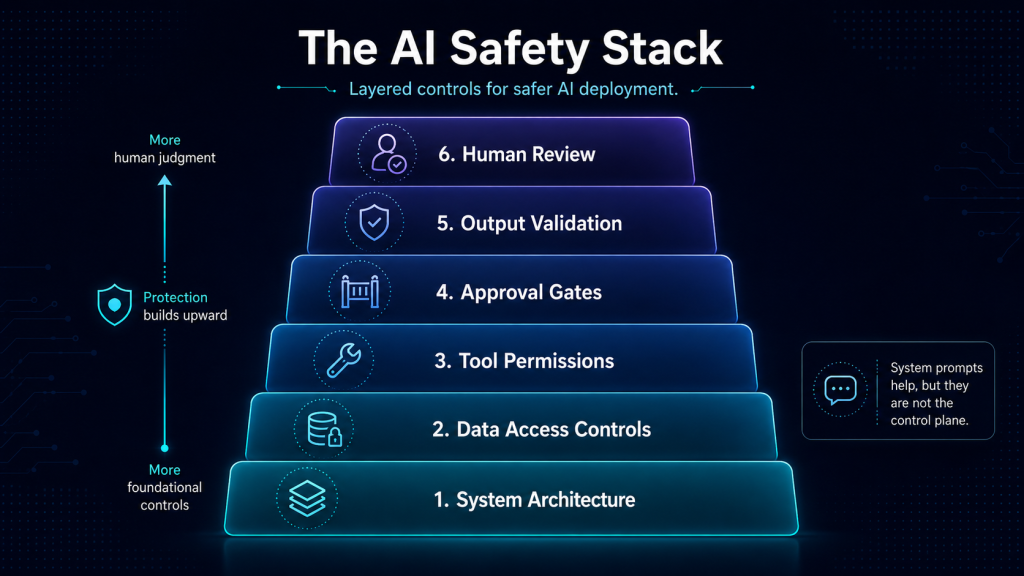
Human review should sit at permission design: deciding what the system can and cannot access before it’s turned on. It should sit at approval for external actions: anything that sends, publishes, submits, or commits on behalf of the business. It should sit at output review for sensitive or regulated workflows, where a polished-sounding wrong answer can create legal, financial, or reputational damage. And it should sit at monitoring: watching for failures, exceptions, drift, and the slow degradation of quality that’s easy to miss when every output looks professionally formatted.
There’s one more review point that most teams skip, and it may be the most important: periodically asking whether the tool is actually saving time.
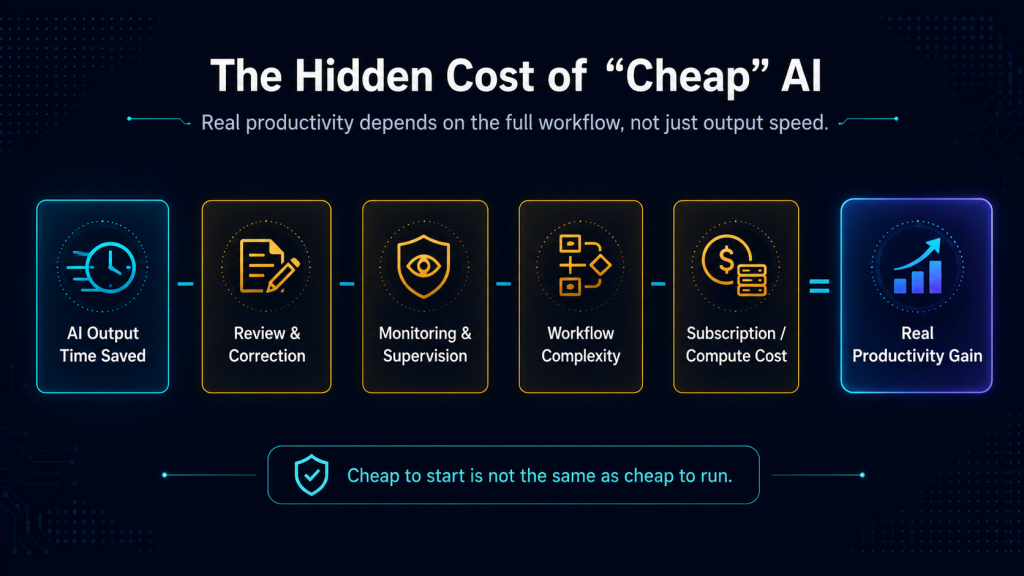
One of the easiest AI mistakes is assuming that automation creates efficiency by default. In practice, some systems create rework, monitoring burden, debugging time, and workflow complexity that outweigh the productivity gain. A tool that drafts a document in ten seconds but requires thirty minutes of review, correction, and reformatting didn’t save twenty minutes. It moved the work and added a quality-control problem. That calculus is especially relevant for smaller firms, where every hour of overhead falls on the same few people.
A useful question to keep asking: if an AI workflow takes six steps to supervise, document, and correct, did you automate the work or just relocate it?
What Should You Do?
For smaller businesses (under $1M):
Stay with low-risk use cases first. Drafting, summarizing, internal organization, proposal support, and repeatable content are safer starting points than tools with deep file, inbox, or financial-system access. These are also the use cases most likely to survive a price increase, because the compute they require is modest.
Avoid self-hosted agents on your primary business systems unless you understand the security model. Tools like OpenClaw are better treated as sandbox experiments, not casual installs.
Ask one discipline question before adopting any new tool: is this reducing real work, or is it adding supervision overhead that I’ll be paying for in time, attention, and eventually in subscription costs?
For larger businesses:
Start drawing a clear line between AI use and AI governance. Standardize which tools are approved, where sensitive data can and cannot go, and what actions require human approval before the system executes.
Treat workflows involving customer data, contract data, or financial data as higher-risk categories. Gartner’s warning about “no-go zones” when agents combine sensitive data, untrusted content, and external communication is a useful frame for deciding where the boundaries should sit.
Begin thinking about cost resilience. The tools that are cheap today may not be cheap in eighteen months. Building workflows that depend on underpriced compute is a form of technical debt. The firms that deploy efficiently now, using the right-sized tool for the right-sized task, will be better positioned when pricing reflects actual costs.
For corporate members:
Update supplier and internal evaluation questions. Don’t just ask whether a vendor uses AI. Ask how it’s governed, what review points exist, what systems it can access, and what happens when something goes wrong. The quality of those answers will tell you more about operational maturity than any capabilities deck.
Treat AI agents as privileged workloads, not casual productivity tools. Axios’ security roundtable used that frame well: if an agent can read, write, and execute across systems, it deserves the same access controls and monitoring you’d apply to any other system with that level of reach.
Build internal policy around access, outputs, logging, and approval workflows, not just acceptable-use language. Acceptable-use policies tell people what not to do. Governance architecture makes it harder to do the wrong thing by default.
The Takeaway
The first AI divide was access. That divide is closing fast.
The next one is operational, and it has two faces. The first is security: who can deploy these tools with discipline, clear permissions, and real human review? The second is economics: who can deploy them efficiently enough that the workflows still make sense when the current pricing environment changes?
As AI systems gain the ability to retrieve, connect, and act, both questions start to matter more than whether a company has the tools at all. Reuters, Gartner, and OWASP are all pointing in the same direction: the spread of AI is becoming a security and governance story as much as a productivity story. And last month’s infrastructure analysis still applies. Software is getting more capable. The physical and financial systems underneath it are getting more constrained.
As quality differences between commercial and even open source AI models shrinks, disciplined deployment will become the biggest differentiator.